> ## Documentation Index
> Fetch the complete documentation index at: https://help.checkrmoney.com/llms.txt
> Use this file to discover all available pages before exploring further.

# MCP for AI Agents

> Give your coding agent access to Checkr Money financial data via the Model Context Protocol.

## What is MCP for AI Agents?

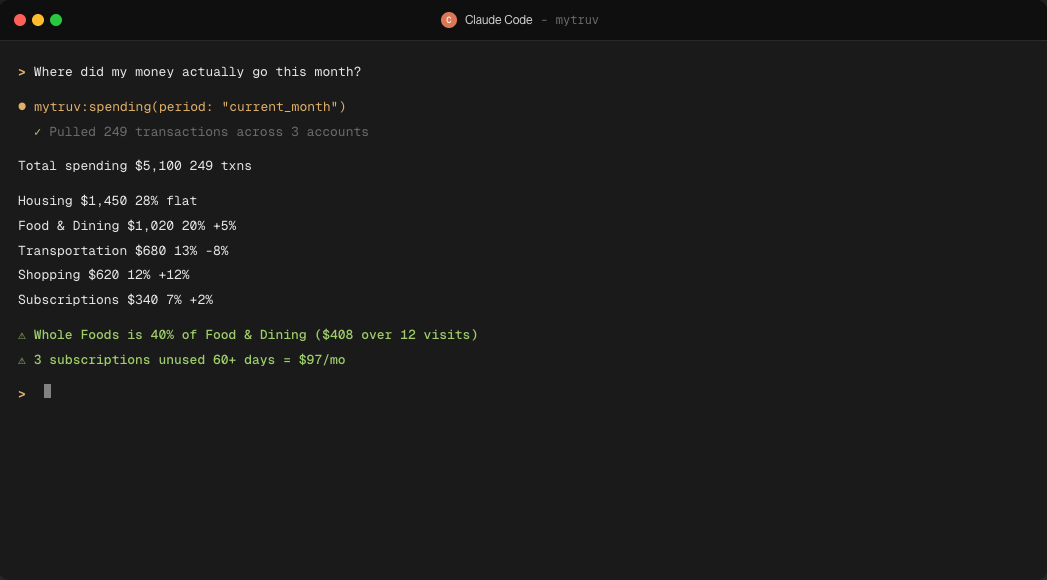
The same hosted MCP server that powers chat apps also exposes your Checkr Money data to agentic developer tools - Claude Code, Codex, Cursor, and any other client that speaks MCP. Drop the URL into the agent's config and it can call tools to inspect your accounts, transactions, spending, and income while reasoning over your code or workflows, and to fix a category or merchant name when you ask.

<Frame>
  <img src="https://mintcdn.com/checkrmoney/_HEqG_a_UJ268Pb6/images/product/mcp/claude-code-session.png?fit=max&auto=format&n=_HEqG_a_UJ268Pb6&q=85&s=e0696e599d802396cb8e181d7842903a" alt="Claude Code session calling mytruv:spending and rendering a categorized monthly breakdown in the terminal" width="1047" height="580" data-path="images/product/mcp/claude-code-session.png" />
</Frame>

<Info>
  Checkr Money MCP reads your data and, when you ask, updates how your transactions are labeled in Checkr Money: categories, merchant names, hidden and recurring flags, and merchant rules. It never changes anything at your bank or payroll provider and can't move money. Deleting a rule asks you to confirm first. See [Available tools](/mytruv-mcp/tools).
</Info>

<Tip>
  Already signed in to Checkr Money? Find this and the other AI integration links anytime from **Settings > AI Integrations** in the web app.
</Tip>

***

## Prerequisites

* A Checkr Money Pro subscription (monthly or annual) with at least one connected bank or payroll account
* A coding agent or terminal client that supports MCP servers over OAuth

<Warning>
  Checkr Money MCP is only available on the Pro plan. [Upgrade to Pro](/billing/subscription-plans) to get started.
</Warning>

***

## How authentication works

OAuth - no API keys or tokens to manage. The first time the agent calls a Checkr Money tool, your browser opens so you can authorize access. The session stays active until you sign out.

The server URL is:

```
https://api.mytruv.com/mcp
```

***

## Pick your agent

<div className="mytruv-card-grid">
  <a className="mytruv-card" href="/mytruv-mcp/setup/claude-code">
    <span className="mytruv-card__icon">
      <svg viewBox="0 0 24 24" fill="none" stroke="currentColor" strokeWidth="1.75" strokeLinecap="round" strokeLinejoin="round">
        <path d="M4 17l6-6-6-6" />

        <path d="M12 19h8" />
      </svg>
    </span>

    <h3 className="mytruv-card__title">Claude Code</h3>
    <p className="mytruv-card__body">One-command install in the Claude Code CLI</p>

    <span className="mytruv-card__arrow">
      <svg width="16" height="16" viewBox="0 0 24 24" fill="none" stroke="currentColor" strokeWidth="2" strokeLinecap="round" strokeLinejoin="round">
        <path d="M7 17L17 7" />

        <path d="M8 7h9v9" />
      </svg>
    </span>
  </a>

  <a className="mytruv-card" href="/mytruv-mcp/setup/codex">
    <span className="mytruv-card__icon">
      <svg viewBox="0 0 24 24" fill="none" stroke="currentColor" strokeWidth="1.75" strokeLinecap="round" strokeLinejoin="round">
        <path d="M16 18l6-6-6-6" />

        <path d="M8 6l-6 6 6 6" />
      </svg>
    </span>

    <h3 className="mytruv-card__title">Codex</h3>
    <p className="mytruv-card__body">OpenAI Codex CLI via CLI or config.toml</p>

    <span className="mytruv-card__arrow">
      <svg width="16" height="16" viewBox="0 0 24 24" fill="none" stroke="currentColor" strokeWidth="2" strokeLinecap="round" strokeLinejoin="round">
        <path d="M7 17L17 7" />

        <path d="M8 7h9v9" />
      </svg>
    </span>
  </a>

  <a className="mytruv-card" href="/mytruv-mcp/setup/cursor">
    <span className="mytruv-card__icon">
      <img src="https://mintcdn.com/checkrmoney/_HEqG_a_UJ268Pb6/images/logos/cursor.svg?fit=max&auto=format&n=_HEqG_a_UJ268Pb6&q=85&s=23669a1de563cbd2aba1420a639c9c32" alt="" width="16" height="16" data-path="images/logos/cursor.svg" />
    </span>

    <h3 className="mytruv-card__title">Cursor</h3>
    <p className="mytruv-card__body">Cursor Settings UI or mcp.json</p>

    <span className="mytruv-card__arrow">
      <svg width="16" height="16" viewBox="0 0 24 24" fill="none" stroke="currentColor" strokeWidth="2" strokeLinecap="round" strokeLinejoin="round">
        <path d="M7 17L17 7" />

        <path d="M8 7h9v9" />
      </svg>
    </span>
  </a>

  <a className="mytruv-card" href="/mytruv-mcp/setup/other">
    <span className="mytruv-card__icon">
      <svg viewBox="0 0 24 24" fill="none" stroke="currentColor" strokeWidth="1.75" strokeLinecap="round" strokeLinejoin="round">
        <path d="M9 2v6" />

        <path d="M15 2v6" />

        <path d="M6 8h12v4a6 6 0 0 1-12 0z" />

        <path d="M12 18v4" />
      </svg>
    </span>

    <h3 className="mytruv-card__title">Other clients</h3>
    <p className="mytruv-card__body">Gemini CLI, VS Code, JetBrains, Windsurf, Zed, and more</p>

    <span className="mytruv-card__arrow">
      <svg width="16" height="16" viewBox="0 0 24 24" fill="none" stroke="currentColor" strokeWidth="2" strokeLinecap="round" strokeLinejoin="round">
        <path d="M7 17L17 7" />

        <path d="M8 7h9v9" />
      </svg>
    </span>
  </a>
</div>

Using Claude.ai or ChatGPT? See [MCP for AI Chats](/mytruv-mcp/overview).

***

## Try it out

After connecting, ask the agent to query something concrete - for example, "summarize my last month of spending" or "list my recurring subscriptions over \$20". The agent will call Checkr Money tools under the hood and return the answer with the data it pulled.

<div className="mytruv-card-grid">
  <a className="mytruv-card" href="/mytruv-mcp/tools">
    <span className="mytruv-card__icon">
      <svg viewBox="0 0 24 24" fill="none" stroke="currentColor" strokeWidth="1.75" strokeLinecap="round" strokeLinejoin="round">
        <path d="M14.7 6.3a1 1 0 000 1.4l1.6 1.6a1 1 0 001.4 0l3.77-3.77a6 6 0 01-7.94 7.94l-6.91 6.91a2.12 2.12 0 01-3-3l6.91-6.91a6 6 0 017.94-7.94l-3.76 3.76z" />
      </svg>
    </span>

    <h3 className="mytruv-card__title">Available tools</h3>
    <p className="mytruv-card__body">The full set of read and write tools your agent can call.</p>

    <span className="mytruv-card__arrow">
      <svg width="16" height="16" viewBox="0 0 24 24" fill="none" stroke="currentColor" strokeWidth="2" strokeLinecap="round" strokeLinejoin="round">
        <path d="M7 17L17 7" />

        <path d="M8 7h9v9" />
      </svg>
    </span>
  </a>
</div>

***

## Limitations

* Pro plan required - Checkr Money MCP is not available on the free plan
* Changes stay inside Checkr Money - the write tools only edit your own transaction labels and merchant rules, never your accounts at the bank


This documentation is built and hosted on [Mintlify](https://mintlify.com), a developer documentation platform.